- Published on
Stream Remote Media With Plex
- Authors

- Name
- Chris Sykes
- Github
Introduction
It wasn't that long ago that streaming even 480p quality content wasn't reliable for a lot of people. Torrent downloads shipped as 40+ part RAR archives with SFVs included to run checksums to deal with the unreliable Internet. Streaming options were limited. Downloads took hours or days to finish and often didn't end up being what you expected. Whether a given device could deal with the audio and video codecs of a file was a crapshoot.
Your only option to get exactly what you wanted at the quality you wanted without fuss was to buy DVDs and Blurays, which took up space and have a problematic and expensive future: when old technology falls out of favor all the market drops off -- usually leaving you to choose between super low-quality gear marketed towards people who "just want it to play" and ultra high-end hi-fi gear meant for enthusiasts. No mid-tier. Not great.
Today, the Internet is fast, cheap and reliable for most people living in urban areas. Downloads are more predictable and file compatibility (with transcoding) is no longer an issue. Streaming can now easily handle the highest quality of audio and visual that content has to offer without any compromises. We're in the digital age. It's cheaper, better for the environment, and faster. Embrace it.
In this post, we'll be going over everything needed to set up your own private streaming service that utilizes RealDebrid as a storage backend.
This is meant to be a basic setup that doesn't require owning a public domain, having internal DNS, or having managed network equipment. Configuration required the aforementioned items is outside the scope of this post.
Without going into the nuances of theoretical lost revenue for everyone involved in making content exist, if everyone downloaded content without paying -- there would be no content. If you have the means to do so, you should pay for content.
Table of Contents
All the moving parts
PVR
These are the services that will handle collecting media.
Prowlarr
Prowlarr is an indexer manager/proxy that integrates with your various PVR apps. Prowlarr supports management of both Torrent Trackers and Usenet Indexers. It integrates seamlessly with Radarr and Sonarr -- offering complete management of your indexers with no per app Indexer setup required.
Sonarr
Sonarr is a PVR for Usenet and BitTorrent users. It can monitor multiple RSS feeds for new episodes of your favorite shows and will grab, sort and rename them. It can also be configured to automatically upgrade the quality of files already downloaded when a better quality format becomes available.
Radarr
Radarr is a movie collection manager for Usenet and BitTorrent users. It can monitor multiple RSS feeds for new movies and will interface with clients and indexers to grab, sort, and rename them. It can also be configured to automatically upgrade the quality of existing files in the library when a better quality format becomes available.
Overseerr (optional)
Overseerr is a free and open source software application for managing requests for your media library. It integrates with your existing services, such as Sonarr, Radarr, and Plex!
Remote Storage
These are the services that will manage and mount the remote storage.
RealDebrid
RealDebrid is a paid streaming link service — it acts like a massive, shared torrent cache. When anyone downloads a torrent through Real-Debrid, it’s stored and cached on their servers. If you grab that same file later, you’re pulling it directly from Real-Debrid at full speed, often instantly. This also means you can use it as “unlimited” cloud storage for Plex: add a torrent, let Real-Debrid cache it, then stream it straight to your Plex library without keeping the files locally.
There are a few other options out there, but because of slight differences in the way they work, support through various apps is a mixed bag. Support for RealDebrid is the default on every application in this post, as well as the alternatives not mentioned.
Zurg
Zurg is self-hosted Real-Debrid WEBDAV server written from scratch. Together with rclone it can mount your Real-Debrid torrent library into your file system like Dropbox.
Rclone
Rclone ("rsync for cloud storage") is a P command-line program to sync files and directories to and from different cloud storage providers.
Download clients
These are the services that will fulfill the downloads requested by the PVR apps. The optional apps downloading locally for certain content you want available without Internet. Managing what is local or remote is outside the scope of this post.
Decypharr
Decypharr is an implementation of QbitTorrent with Multiple Debrid service support, written in Go. Decypharr combines the power of QBittorrent with popular Debrid services to enhance your media management. It provides a familiar interface for Sonarr, Radarr, and other *Arr applications.
qBittorrent (optional)
qBittorrent is a bittorrent client programmed in C++ / Qt that uses libtorrent (sometimes called libtorrent-rasterbar) by Arvid Norberg.
Sabnzbd (optional)
SABnzbd is an Open Source Binary Newsreader written in Python.
Streaming
These are the services that can handle streaming the media to client devices. I recommend Plex, but I've listed the main alternatives. Why you might choose an alternative is outside the scope of this post.
Plex
Plex is a powerful media server platform that lets you organize, stream, and enjoy your personal collection of movies, TV shows, music, and photos — all from one place. Once set up, Plex automatically fetches artwork, trailers, and detailed metadata to make your library look and feel like a professional streaming service. You can access your content anywhere, on virtually any device, and even share your library with friends and family. Plex also offers free ad-supported movies, TV, and live channels, making it a one-stop entertainment hub for both your personal media and online content.
Emby (alternative)
Emby is a personal media server with apps on just about every device. It features a REST-based API with built-in documentation to facilitate client development. We also have client libraries for our API to enable rapid development.
Jellyfin (alternative)
Jellyfin is a Free Software Media System that puts you in control of managing and streaming your media. It is an alternative to the proprietary Emby and Plex, to provide media from a dedicated server to end-user devices via multiple apps. Jellyfin is descended from Emby's 3.5.2 release and ported to the .NET Core framework to enable full cross-platform support.
Design
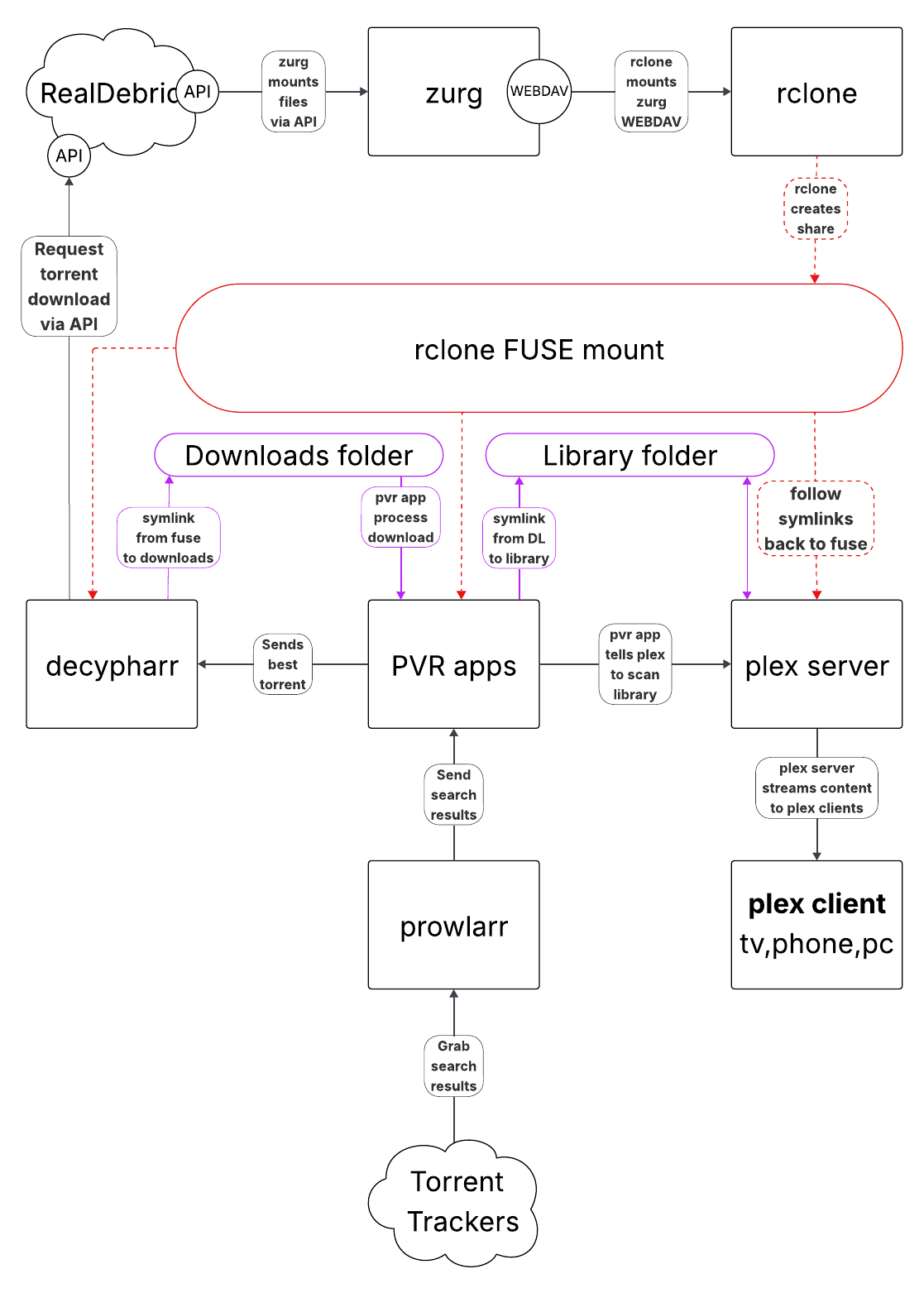
As illustrated in the example above, the goal is to download and store content on RealDebrid and get Plex to see that content as local, organized files.
- Zurg mounts RealDebrid via API calls and then presents it as a WEBDAV share.
- Rclone mounts the WEBDAV share and makes it accessible to other containers.
- Decypharr, Radarr, Sonarr, and Plex all mount the Rclone mount to ensure symlinks resolve.
- Radarr/Sonarr use Prowlarr to find the best version of your requests and send the torrent to Decypharr.
- Decypharr sends the torrent to RealDebrid to download via API calls. Once completed, a symlink is created from the rclone mount to the downloads folder.
- Radarr/Sonarr see the file in the downloads folder as complete and performs processing. It moves the symlink to the Plex library, organizes, and renames the file.
- Radarr/Sonarr tell Plex to scan its library for the new files just added.
- Plex sees the remote files as local, well-organized files.
- Plex, if necessary, converts files for compatibility on the fly and streams them to client devices.
Setup
Prerequisites
- Linux, preferably Ubuntu if you have no preference otherwise.
- 120 GB of (preferably SSD) storage. This is for media posters, artwork, theme music, chapter thumbnails, etc. that Plex and PVR apps generate.
- Reliable hardware. If you don't transcode, the power requirements are low. Hardware for transcoding is outside the scope of this post.
System Setup
Let's start by making sure our system is updated and has Docker installed.
sudo apt update -y && sudo apt upgrade -y
sudo apt-get install ca-certificates curl
sudo install -m 0755 -d /etc/apt/keyrings
sudo curl -fsSL https://download.docker.com/linux/ubuntu/gpg -o /etc/apt/keyrings/docker.asc
sudo chmod a+r /etc/apt/keyrings/docker.asc

echo \
  "deb [arch=$(dpkg --print-architecture) signed-by=/etc/apt/keyrings/docker.asc] https://download.docker.com/linux/ubuntu \
  $(. /etc/os-release && echo "${UBUNTU_CODENAME:-$VERSION_CODENAME}") stable" | \
  sudo tee /etc/apt/sources.list.d/docker.list > /dev/null
sudo apt-get update

sudo apt-get install docker-ce docker-ce-cli containerd.io docker-buildx-plugin docker-compose-plugin
Now let's get folders created for the realdebrid mount, the downloads folder, the plex library, and the root "data" folder that contains the previous two folders.
mkdir -p \
~/data \
~/data/downloads/decypharr \
~/data/media/movies \
~/data/media/tv

sudo mkdir -p /mnt/remote/realdebrid
Now we'll clone my example GitHub repo to get the folders for docker and the apps set up.
cd ~
git clone https://github.com/chillincool/example-plex-rd-stack.git
cd example-plex-rd-stack
Initial Config and Install
Quick Start
If you've followed the instructions up until this point, you should be able to use the environment file as-is with mv env.example .env. You'll want to grab your API key off RealDebrid and get it put in the ./appdata/zurg/config.yml file...and we're ready!
Bring it all online with docker compose up -d and docker will download and deploy all the images with the config parameters we configured. You'll be able to connect to the various web GUI's on the port configured in your compose file.
Volumes
If you've followed along so far, this section is informational. With docker volumes (and with many written in a key:pair style), the folder path in the left is the host and the folder path on the right is the container. In linux, / is the root directory and everything past that is a folder inside the root directory. So, if you take a volume mount as /mnt/remote/realdebrid:/realdebrid, this would take /mnt/remote/realdebrid on the host and mount it as /realdebrid inside the container.
Let's take a look at a common folder structure inside the 'data' folder:
data
    ├── downloads
    │   └── decypharr
    └── media
        ├── anime
        ├── movies
        └── shows
When possible, you should attempt to give a container access only to what it needs. Sonarr/Radarr need access to both the downloads folder and media folder, so we give them access to the entire data/ folder. Decypharr only needs access to the downloads folder and Plex only needs access to the media folder.
This ultimately means that the volumes for Decypharr and Plex need to follow the pattern you set with Sonarr/Radarr.
If your volume for Radarr is /data:/data, then your volume for Decypharr needs to be /data/downloads/decypharr:/data/downloads/decypharr. Doing it this way accomplishes 2 things:
- When Decypharr tells Radarr to look for a finished download at
/data/downloads/decypharr/Example.Movie.mkv, Radarr can find the download at the path the same way Decypharr sees it. - Gives Decypharr access only to
/data/downloads/decypharreven though it's still creating the underlying folders. It's actually only mounting specifically the/decypharrfolder from the host.
App Configuration
Many of these apps are pretty intuitive, so I won't go into a full step-by-step setup for most of these.
You'll be able to access all of your apps with the port number configured in the docker compose file. For example, Radarr is 7878.
If you installed the desktop version of Linux, you can open a web browser and go to http://localhost:7878, otherwise you'll access it remotely using the ip address of the host running all of this.
Sonarr/Radarr Config
These will prompt you to create a login upon first visit. Finish logging in and grab the API key from Settings>General for a few things later.
Prowlarr Config
This will prompt you to create a login upon first visit. Once logged in, you'll need to add Sonarr and Radarr as 'Apps'.
radarr and vise versa: 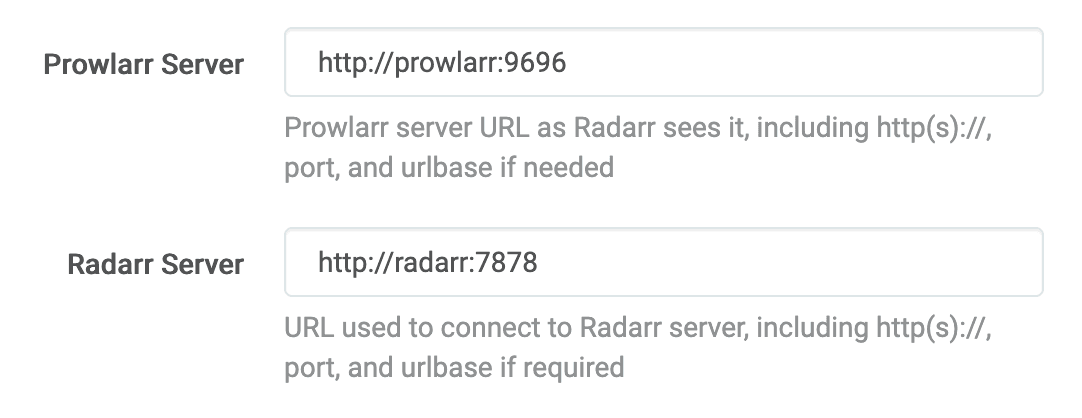
Right below, you'll add in the API key you grabbed from earlier. Hit test and you should get a green check. Sonarr and Radarr will now have access to any indexer you add as a source within Prowlarr.
Plex Config
This is a very polished product that doesn't need much explanation. The main thing worth mentioning here is that you may have to append /web to the end of the url to get it to load, i.e. http://localhost:32400/web
Decypharr Config
Create your initial user and get settings opened up. Defaults are fine for General.
In the Debrid tab, add your Real Debrid API key. If you followed the examples, your Mount/Rclone folder should be /mnt/remote/realdebrid/__all__ (the all folder is where zurg dumps all the torrents). Everything else default is fine.
In Qbittorrent tab, the Symlink/Download folder should be /data/downloads/decypharr. Everything else default is fine.
*Arrs and Repairs are optional, but you can feel free to add them in.
Overseerr Config (optional)
This is a request management app that you log into using your Plex credentials. It pulls data from IMDB and Trakt, so it's a decent source of content even for purely personal use.
Qbittorrent/SabNZBD Config (optional)
These are optional download clients for if you for any reason wanted to download some content locally. Maybe something rare or something you want to make sure you have access to without Internet.
Sonarr/Radarr Config (again)
The last step is to go into these apps and add Decypharr as a download client with qbittorrent as the type. If you add the optional download clients, add a tag to them. Now, only things you add into Sonarr/Radarr with that tag will use those local download clients and everything else will use the remote storage.
Maintenance
Backups
2 things need to be backed up in order to arbitrarily spin everything up again on a different computer:
- Your config folder with all the persistent config files the various apps saved. How to back this up is outside the scope of this post.
- Your docker compose file as well as the specific config files you mounted for zurg and rclone. I'd recommend backing this up using a free private GitHub repo. Setting up the repo is outside the scope of this post. Making your config files safe for a public repo is also outside the scope of this post.
Updates
You can pull updates for the containers with docker compose pull and then run docker compose up -d again to re-deploy any active containers that don't have the latest image.
All these apps are generally safe to keep on the "latest" tag and update arbitrarily without needing some grand rollback plan. You could even go as far to set up something like Watchtower to do scheduled updates, but that's outside the scope of this post.
Conclusion
With this setup you should be able to add content to Radarr/Sonarr, and it will almost instantly become available for viewing in Plex.
Here's an incomplete list of things you could do with further customization:
- Set up DNS, so you can type names instead of IP addresses
- Get rid of the need to type the port numbers
- Add HTTPS so that your browser stops complaining
- Set Overseerr up so that anything you add to your Plex watch-list through discovery gets added and almost immediately available to watch in Plex.
- Set up custom quality profiles to prioritize specific personal-preference things like dual language audio, subtitles, or 5.1 surround sound.