- Published on
Setting up a self-hosted IdP with Keycloak
- Authors

- Name
- Chris Sykes
- Github
Introduction
Every self-hosted app comes with its own user database and its own idea of what an admin is. Some don't have a login at all and expect you to put something in front of them. After a dozen or so apps I had local accounts everywhere and no easy way to tell who could get into what.
Sharing made it worse. My family wanted access to the audiobook library, and doing that with local accounts meant creating one in each app and remembering to clean them up later.
An identity provider (IdP) solves this. Users live in one place, every app sends people to the same login page, and 2FA and access rules are set once instead of per app. I use Keycloak for this. This post covers how it's deployed, how apps with and without their own login are put behind it, and how access is handed out.
It isn't a click-by-click Keycloak tutorial. Keycloak's docs cover the UI well; this is about how the pieces fit together.
Table of Contents
All the moving parts
- Keycloak 26: users, groups, roles, login pages and 2FA.
- Kubernetes: where Keycloak and the apps run.
- CloudNativePG: the Postgres database Keycloak stores everything in.
- Envoy Gateway: the reverse proxy in front of every app. Its
SecurityPolicyresource can handle OIDC logins itself, so apps without their own login don't need a separate auth proxy.
Deploying Keycloak
Keycloak runs as a single pod from the official quay.io/keycloak/keycloak image. The relevant config:
args:
  - start
  - --import-realm
env:
  KC_DB: postgres
  KC_DB_URL_HOST: keycloak-db-rw.keycloak.svc.cluster.local
  KC_HTTP_ENABLED: 'true' # TLS ends at the gateway
  KC_PROXY_HEADERS: xforwarded # trust X-Forwarded-* from Envoy
  KC_HEALTH_ENABLED: 'true'
  KC_METRICS_ENABLED: 'true'
  KC_HTTP_MANAGEMENT_PORT: 9000 # health + metrics live here, not on 8080
  KC_CACHE: local # single pod, no need for a distributed cache
--import-realm loads a realm JSON file on first boot and skips it if the realm already exists, so it only works as a bootstrap.
KC_PROXY_HEADERS: xforwarded is needed whenever Keycloak sits behind a proxy that terminates TLS. Without it, Keycloak thinks it's being served over plain HTTP on an internal address and generates redirect URLs to match.
Health and metrics endpoints are on the management port (9000), so the probes and the Prometheus scrape point there.
The database is managed by CloudNativePG, with continuous WAL archiving and a nightly base backup to R2 object storage.
Keeping the admin console private
The login page has to be reachable from the internet (the Tailscale section explains why), but the admin console doesn't. On the public hostname, anything under /admin or the master realm gets redirected to the user account page:
- filters:
    - type: RequestRedirect
      requestRedirect:
        path:
          type: ReplaceFullPath
          replaceFullPath: /realms/example/account/
        statusCode: 302
  matches:
    - path: { type: PathPrefix, value: /admin }
    - path: { type: PathPrefix, value: /realms/master }
The admin console has its own hostname that only resolves on the LAN.
Two kinds of apps
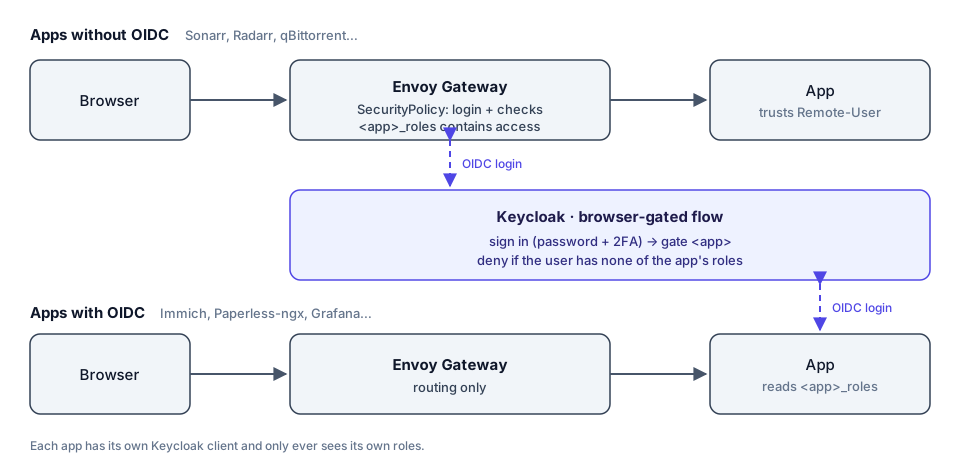
Apps get protected in one of two places depending on whether they support OIDC themselves.
Apps without OIDC
Sonarr, Radarr, Prowlarr, qBittorrent and similar apps either have no real auth or a basic one I don't want to rely on. They get an Envoy Gateway SecurityPolicy, so the request never reaches the app until you've logged in to Keycloak.
It's a Kustomize component, so adding an app means including the component and creating a client in Keycloak:
apiVersion: gateway.envoyproxy.io/v1alpha1
kind: SecurityPolicy
metadata:
  name: ${APP}-auth
spec:
  targetRefs:
    - group: gateway.networking.k8s.io
      kind: HTTPRoute
      name: ${APP}
  oidc:
    provider:
      issuer: https://login.example.com/realms/example
    clientID: ${APP}
    clientSecret:
      name: ${APP}-oidc-secret
    redirectURL: https://${APP}.example.com/oauth2/callback
    forwardAccessToken: true
  jwt:
    providers:
      - name: keycloak
        issuer: https://login.example.com/realms/example
        remoteJWKS:
          uri: https://login.example.com/realms/example/protocol/openid-connect/certs
        claimToHeaders:
          - claim: preferred_username
            header: Remote-User
          - claim: email
            header: Remote-Email
claimToHeaders copies the username and email from the verified token into Remote-User and Remote-Email headers. Some apps, like Firefly III, Navidrome and Shelfmark, can be set to trust those headers and log you in without showing their own login page.
An app that trusts a header will believe whatever that header says, so the whole point is making sure the only way to reach it is through Envoy:
- Envoy only forwards after the login. A request without a valid Keycloak session is redirected to the login page and never reaches the app. When it does reach the app, the header values come from a token Envoy has checked against Keycloak's signing keys.
- Every route to the app has the policy. If an app is reachable on a second hostname, like an internal or Tailscale-only one, that route needs the same
SecurityPolicy. One unprotected route is enough to get around the rest. - The app can't be reached directly. A network policy blocks connections from outside the cluster to pods, except to Envoy itself, so nobody can skip the gateway by connecting to the app's pod or service.
Each app gets its own Keycloak client rather than sharing one. It's more setup, but each app can then have its own roles and its own secret.
Apps with OIDC
Immich, Paperless-ngx, Grafana, autobrr and others talk to Keycloak directly. I don't put the Envoy policy in front of these; access is checked inside Keycloak during login instead (see Gating logins in Keycloak).
The access model
The main rule is that each app only sees its own roles.
Per-app client roles
The common approach is realm-wide groups like admins and family, sent to every app in a groups claim. That means every app sees every group, and each one has to be configured to make sense of them.
Instead, each app's client has:
- A client role called
access. - A client scope named
<app>_roleswith a User Client Role mapper that puts only that client's roles into a claim of the same name. - The default
rolesandgroupsscopes removed and Full scope allowed turned off, so no other roles or group memberships end up in the token.
Sonarr's token ends up with sonarr_roles: ["access"] and nothing else.
Admin and user roles
access is enough for apps like Sonarr, where you're either in or you're not. Apps with their own permission levels get admin and user roles instead: Audiobookshelf, Immich, Paperless-ngx, Grafana and Proxmox.
The app maps the claim onto its own permissions. abs_roles: ["admin"] makes me an Audiobookshelf admin, and abs_roles: ["user"] gives family a regular account that can't change settings. Changing someone's role in Keycloak changes it in the app on their next login.
These apps don't also get an access role; having either admin or user counts as access.
A couple of apps needed specific handling:
- Immich reads its role from a single string, not a list, so its mapper is single-valued and each person gets exactly one Immich role.
- Paperless-ngx can sync its groups from a claim on every login. The Keycloak roles are named after the Paperless groups, so Paperless permissions follow Keycloak.
Grafana and Paperless both keep a local admin account that doesn't go through Keycloak, so I can still get in if Keycloak is down.
Groups
Groups are never sent to apps. They're only used inside Keycloak to hand out sets of client roles:
admins: me, with every app'saccessoradminrole.books: Audiobookshelf asadminoruser, andaccesson the other book apps.photos: Immich, asadminoruser.documents: Paperless-ngx
Giving a family member the audiobook library means creating their user and adding them to books. They can log in to the book apps, and every other app turns them away.
Deny by default in Envoy
Once every Envoy-protected app had its own access role, the component could deny by default:
authorization:
  defaultAction: Deny
  rules:
    - name: access
      action: Allow
      principal:
        jwt:
          provider: keycloak
          claims:
            - name: ${APP}_roles
              valueType: StringArray
              values:
                - access
A valid Keycloak login is no longer enough on its own; the token has to carry that app's access role.
Gating logins in Keycloak
Apps that handle OIDC themselves need the same check, and the place to do it is Keycloak's login flow. Keycloak lets you build custom authentication flows. Mine is called browser-gated:
sign in(required): the normal browser login, meaning cookie, identity provider redirector, then username/password and 2FA.gate <app>(conditional): one sub-flow per app, containing:- Condition - client scope: the client has the
<app>_rolesscope. - Condition - user role: the user has
<app>.access, with Negate output on. - Deny access (required).
- Condition - client scope: the client has the
If you log in to that app without its access role, Keycloak shows an access-denied page and the app never receives a token.
For apps with admin and user roles, the sub-flow gets a second role condition:
- Condition - client scope:
paperless-ngx_roles - Condition - user role:
paperless-ngx.admin, negated - Condition - user role:
paperless-ngx.user, negated - Deny access (required)
Conditions in a sub-flow are ANDed, so this denies the login only when the user has neither role. Each condition needs to be set to Required. A Disabled condition is skipped rather than evaluated, which changes what the gate checks.
The same flow covers more than web apps. My NAS's admin login, the firewall's admin login (over SAML), Proxmox and Tailscale are all gated this way.
Proxmox
Proxmox VE supports OpenID Connect as a login realm. On the Keycloak side it's a client with admin and user roles and a proxmox_roles scope. Proxmox reads the ID token and the userinfo endpoint, so the mapper needs ID token, access token and userinfo all turned on.
On the Proxmox side the realm is one command:
pveum realm add keycloak --type openid \
  --issuer-url https://login.example.com/realms/example \
  --client-id proxmox --client-key CLIENT_SECRET \
  --username-claim username \
  --autocreate 1 \
  --groups-claim proxmox_roles --groups-autocreate 0 --groups-overwrite 1 \
  --scopes "openid email profile"
--groups-claim proxmox_roles turns the roles in the token into Proxmox group memberships, and --groups-overwrite 1 resets those memberships on every login, so removing a role in Keycloak removes the matching Proxmox permissions the next time that person logs in.
Proxmox appends the realm name to group names, so the admin role maps to a group called admin-keycloak and user maps to user-keycloak. Create the groups and their permissions before anyone logs in:
pveum group add admin-keycloak
pveum group add user-keycloak
pveum acl modify / --groups admin-keycloak --roles Administrator
--autocreate 1 creates a Proxmox user for anyone who logs in successfully. Without a gate, that would be anyone with a Keycloak account, so Proxmox has its own gated proxmox sub-flow that requires proxmox.admin or proxmox.user.
What to give user
user-keycloak above has no permissions yet. What it should get depends on who it's for, and Proxmox's built-in roles cover most cases:
PVEAuditoron/: read-only access to everything, for someone who just wants to see what's running.PVEVMUseron a pool: start, stop, open the console of and back up the VMs in that pool, without being able to create or reconfigure them.PVEVMAdminon a pool: full control over the VMs in that pool.PVEAdminon/: almost everything, except changing system settings and permissions. This is the closest thing to a lower-level admin.
Pools are how you give someone a few VMs without exposing the rest:
pveum pool add lab
pveum pool modify lab --vms 120,121
pveum acl modify /pool/lab --groups user-keycloak --roles PVEVMUser
For a middle tier between admin and user, add a third client role in Keycloak, such as operator. It shows up in Proxmox as operator-keycloak, which can get PVEAdmin on /. The gated proxmox sub-flow then needs a third negated role condition, or people with only that role will be denied.
Not behind the cluster
Unlike everything else, the Proxmox web UI doesn't go through Envoy Gateway. Envoy runs in the cluster, and the cluster runs as a VM on Proxmox, so a broken cluster would take away access to the tool I'd use to fix it. Instead there's a small nginx on the Proxmox host in front of port 8006.
Tailscale: SSO for SSH
Tailscale supports a custom OIDC identity provider, so my tailnet logs in with Keycloak. Tailscale finds the provider through a WebFinger record on your domain. In Keycloak it's another client with an access role, granted through a tailscale group, so whoever doesn't have the role can't add a device to the tailnet.
This is the reason Keycloak's login page is public. A new device isn't on the tailnet yet when it logs in, so the login page can't be something that's only reachable over Tailscale.
Tailscale SSH lets the Tailscale client on a machine handle SSH connections, deciding who can log in as which local user from their tailnet identity. Since that identity comes from Keycloak, SSH ends up with single sign-on as well, without configuring anything SSH-specific in Keycloak. There are no SSH keys to distribute, access is defined in Tailscale's policy file, and removing someone in Keycloak removes their SSH access along with everything else.
The Tailscale side is a flag on the machine:
tailscale up --ssh --advertise-tags=tag:server
and rules in the tailnet policy file:
"ssh": [
  // My own devices: log in to Keycloak again before the session starts
  {
    "action": "check",
    "src": ["autogroup:member"],
    "dst": ["autogroup:self"],
    "users": ["autogroup:nonroot", "root"],
  },
  // The Proxmox host: no re-check, so it still works when Keycloak is down
  {
    "action": "accept",
    "src": ["autogroup:admin"],
    "dst": ["tag:server"],
    "users": ["root"],
  },
],
With check, Tailscale sends you through a fresh Keycloak login, including 2FA, before the SSH session opens. With accept, an existing tailnet session is enough. The Proxmox host uses accept for the same reason it's not behind Envoy: Keycloak runs on that host, so SSH to it can't depend on Keycloak being up. A normal SSH key on the LAN is the last fallback.
Mandatory 2FA
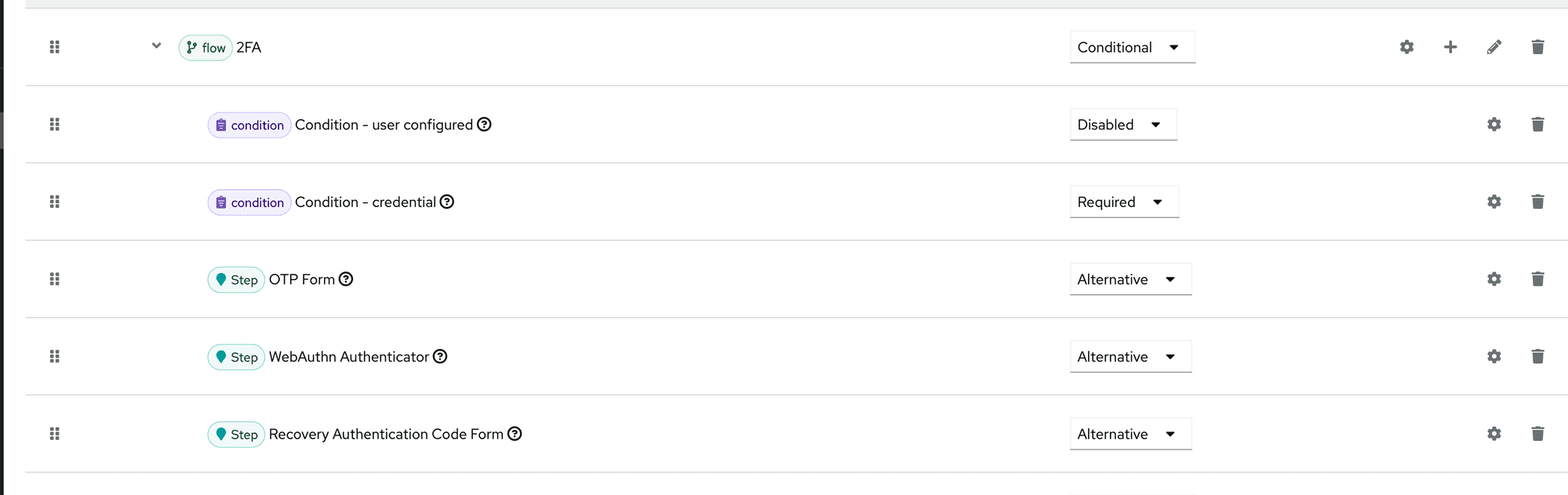
browser-gated is the realm's default browser flow, and 2FA is required for everyone. Keycloak's stock 2FA sub-flow has a Condition - user configured step, which only asks for a second factor if the user has already set one up. I disabled that condition, so every password login needs an OTP code, a security key or a recovery code, and users without one are made to set up an authenticator app on their next login.
Themes
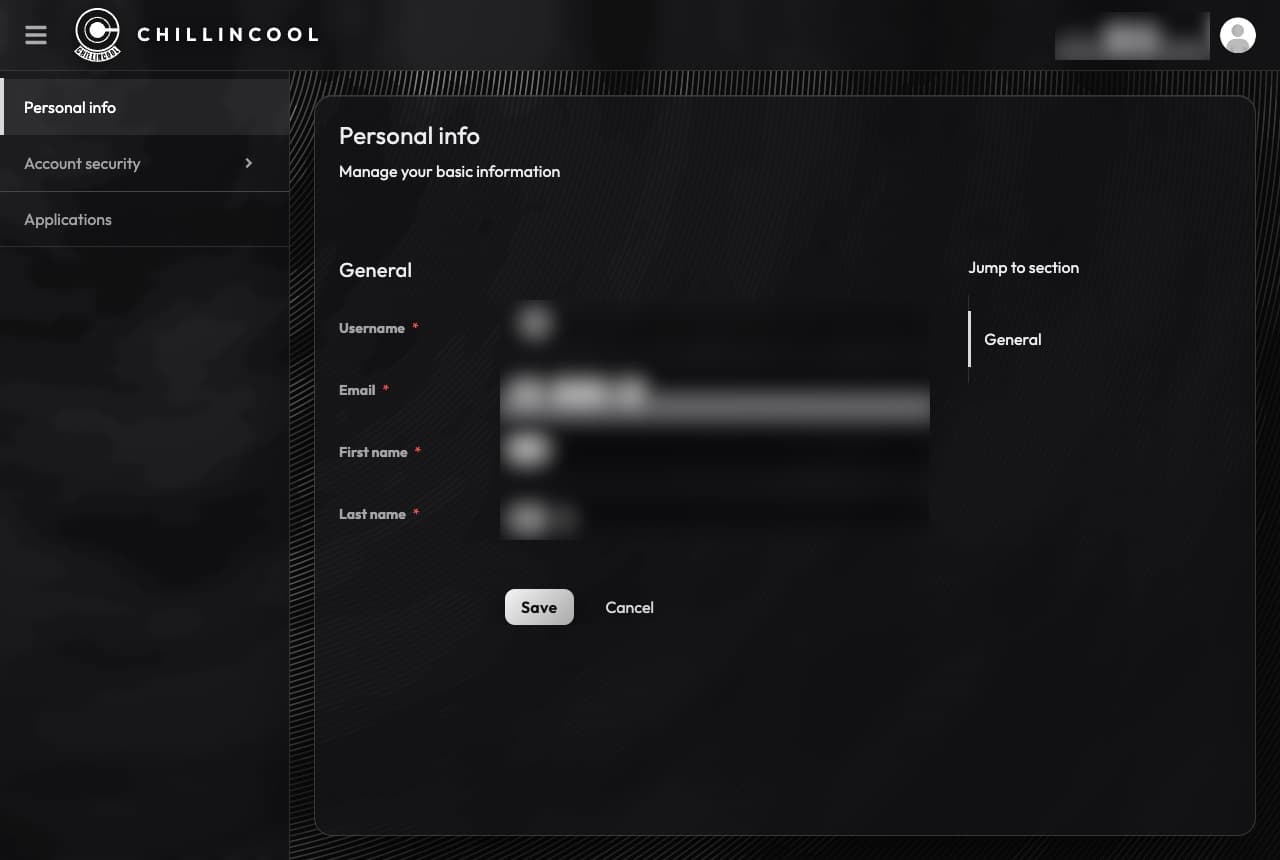
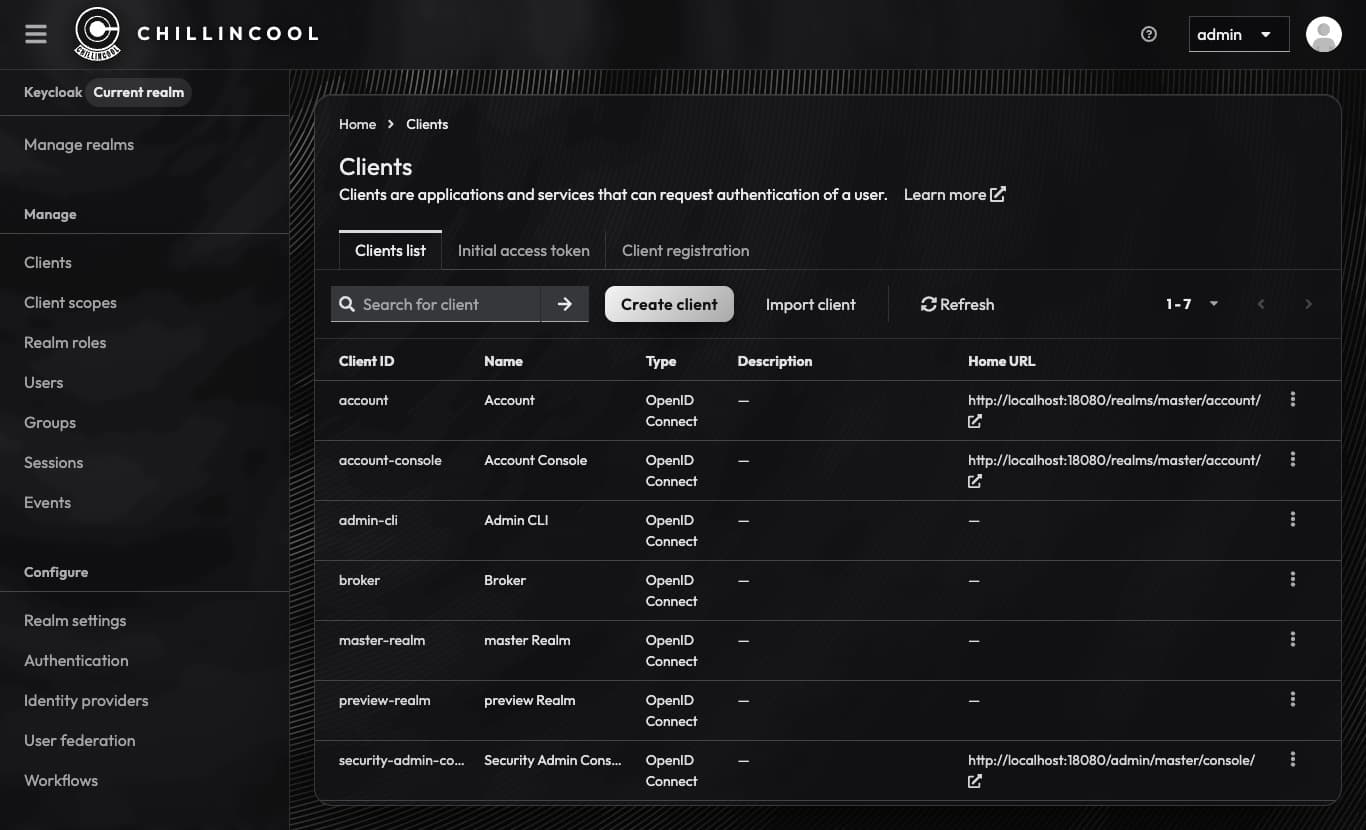
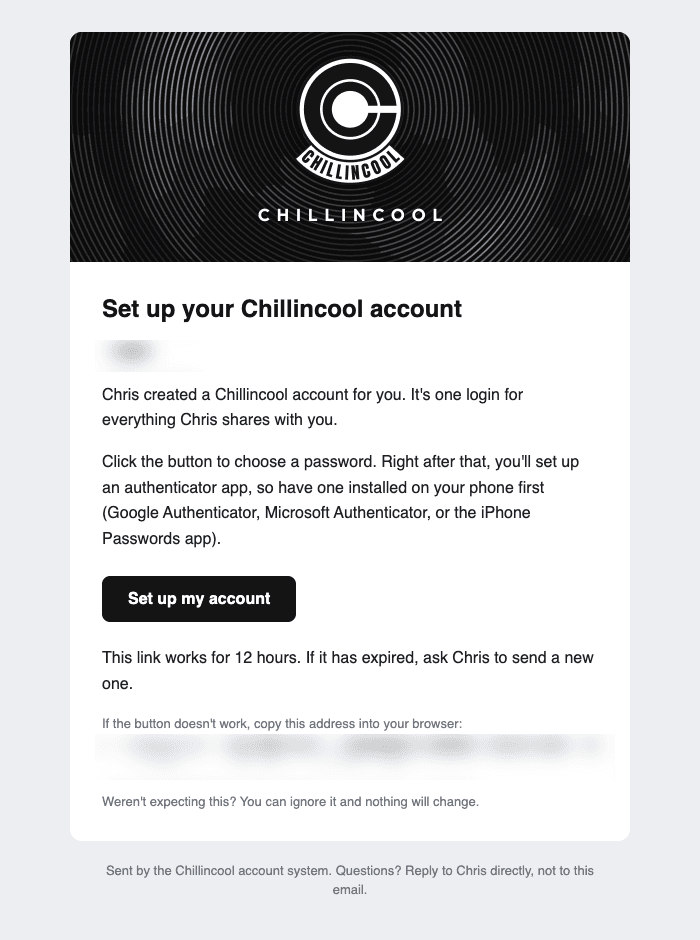
Keycloak's default theme is fine, but it looks like enterprise software, which isn't what family expects when they're trying to get to an audiobook. I made custom themes for the login pages (at the top of this post), the account console, the admin console and the emails Keycloak sends.
What's next
The Keycloak configuration isn't in git. Everything else in the cluster is, but clients, roles and flows only exist in Keycloak's database, and the realm JSON in the repo is an outdated first-boot bootstrap. If the database and its backups were both lost, I'd be rebuilding it by hand.
The next step is managing the realm as code, with keycloak-config-cli or the Terraform provider.